Categories
Home Remodeling Personal

First Day of Summer

Summer Solstice!

Summer officially starts on the American East Coast at 1:16PM, and I’m looking forward to it this year.  I plan on spending more time with family and friends and enjoying the outdoors.  My brother asked me to help install a swing set for the kids (returning the favor from a few years ago), grilling steaks, veggies, hotdogs, and bicycling in the morning and evening.

I am also taking a week off from work this summer to spend time with my children.  We’ll make a few stop at Rita’s, maybe catch a movie, and hopefully catch a Wilmington Blue Rocks game too.  Who knows, maybe I’ll surprise the kids this year and take them to the beach for the day.

On a final note, my office (man cave) will be complete this year!  I’m still working on a few ideas, but I will have a wall mount for a future LED monitor, and a work area for working on PCs.  I was originally going to move the Linksys E4200 router to my office, but I changed my mind.  I will run a CAT 6 cable from the router to my office and connect it to a Linksys SE2800 8-Port Gigabit Ethernet switch.  I could get away with a 5 port switch, but there may be a time when I need a 6th port for something.

I hope your summer will be fun and memorable.

Categories
Geek Stuff Home PC Network Tools Personal Sager Ubuntu Windows 7

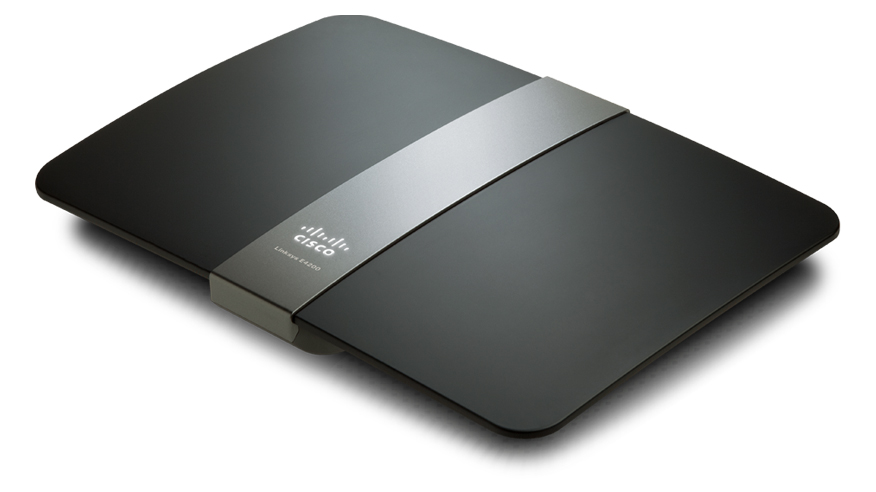
New Linksys E4200 Router

Just over 4 years ago I purchased a Linksys WRT54GS router from Best Buy.  The main reason was to use my work notebook PC because I was not able to go downstairs due to a foot injury. The Linksys WRT54GS worked great.  I never had a problem with firmware updates, the radio signal was strong, and everything I connected through Wi-Fi (including the Wii) worked.  But lately I’ve had a desire to replace the unit to take advantage of wireless N which is on my Sager notebook and my work notebook (Dell Latitude E6400).

I am happy with Linksys products, I’ve recommend them to family, friends, and clients.  So when I heard the Linksys E4200 was available, I had to get it.  But yikes, look at that price!!  Way too expensive, besides the WRT54GS is working fine, no need to upgrade.  However, almost every week, Best Buy or some other company would have ads in the Sunday paper showing me the router I wanted to get, but could not justify the price point.

Then this past Sunday, Best Buy had the router on sale, save $30.00.  Then I remembered I had a Reward Zone $5.00 coupon that was going to expire within 2 weeks, and a $10.00 Best Buy gift card that was waiting for me to use.  My inner voice now said, “How do you feel about saving $45.00 on the router you want?  It has wireless N with a max speed of 450Mbps, guest wireless access, USB drive hookup, and GB wired connections.”  Let’s go shopping!!

This slideshow requires JavaScript.

So on Tuesday I purchased the Linksys E4200 and installed it inplace of the WRT54GS.  The design looks business class.  The Cisco logo lights up.  When the light it solid, everything is good, it blinks during power on or if something is wrong.  The port lights on the back light up, but you can turn them off via the internal web page for whatever reason.  The power supply looks like something  your would expect to see in a notebook.  I like this design over the large block which seems to always take 1.5 – 2 spaces on most power strips and surge protectors.  However, the cord from the AC outlet to the transformer could be a little longer.

You can setup the router with the Cisco software or via your Internet browser at address http://192.168.1.1.  The default password is admin.  I prefer to use the web browser because I have better control of the features I want to enable.  Plus I’ve installed the Linksys software once before on my old Dell PC.  the software brought the PC to an unbearable performance level.

Fist thing, CHANGE THE ROUTER PASSWORD.  Everyone who has a Linksys router has the same password.  If you want to help keep people out of your network, pick a nice complex password, or better a pass-phrase.  Now that’s done, time to setup the wireless.  In my opinion, setting your router not to broadcast your SSID is false security.  Anyone can use Wireshark or other applications to scan the wireless spectrum and will see your SSID anyways.  I like themes, and the last 10 years has been a Star Trek theme for just about everything.  So with my new router, I am going with a new theme.  Now the SSID has a name which reflects the theme I am going with on my PCs.

I left both 5.0 and 2.4GHz on the same SSID with the default channel settings and signal strengths.  Time to start the Sager notebook and experience all the goodness of wireless N… and nothing.  What??  I know the Intel 5300 AGN is a wireless N card like the name states.  Checking Ubuntu Forums, I found an answer from user scarey9.  After modifying the config file, I rebooted the notebook and was ready to experience wireless N… and now what??  Why is my speed fluctuating from 420 Mbps to 1Mbps?

Accessing my e-mail, Internet, playing videos from Youtube was painful.  So let me try booting into Windows 7 x64.  I made the connection to my new router, and I was having the same speed issues.  Playing Battlefied Heroes was terrible.  Something is not right because my old router at a solid 54Mbps can play my on-line games just fine.  Time to do some research again.  Everything I could fine regarding this router stated how great and fantastic it was.  Even after installing the first firmware from Linksys did nothing for me.

I ended up going to Linksys and using WebEx on-line chat.  The technician started helping me by supplying directions on how to configure the router.  After about 45 minutes and looking at the clock (yikes, it is 1:00AM) he said I should take it back to Best Buy an get another one.  Something was wrong with the Wi-Fi.  So I printed the chat history and took it with me when I wen back to Best Buy.

The second router works much better.  The best consistent speed I received is 270 Mbps.  I did see it jump to 450 Mbps, but it does not stay there.  Now I kept some of the suggestions the Linksys tech gave me such as:

  • Setting both 5 and 2.4GHz Network Mode to Mixed.
  • Setting the Channel Width to 40MHz on the 5GHz and moving to Channel 48 – 5.240GHz.
  • Setting the Channel Width to Auto on the 2.4GHz and moving to Channel 9 – 2.452GHz.
  • Enabling SSID Brodcast on both radio frequencies.

What I don’t like about the E4200

Two things that I am very disappointed with this router: USB interface and lack of Parent Controls as in the Linksys Valet.

First, the USB port is 1.1 and 2.0 compliant.  Why not USB 3.0?  It’s been out for a little while, and from what i gathered, the pin connection has not changed for at least 6 months, if not longer.  Plus the performance of the USB port is terrible.  All of my FTP clients and smb connections (Windows shares) timed out.

The Parental Controls via the web interface and the Cisco software are terrible.  With the Valet router I saw, you can select one of the radio buttons for Parent, Teen, Child.  Why would they not include this in the E series?  To my knowledge this is not a business class router.  I can only block a total of 8 URLs on the router.  This is a poor design and should be addressed for the next firmware update.

On last thing which I am confused about is the guest access.  Basically you grant someone access to your wireless connection, they get a 192.168.133.x address and open their web browser.  they enter the password and off they go.  But from what I gathered is they will always have access to you guest network as long as you don’t change the SSID or the password.  This would be OK if the lease expired in a week.  But you can only have a maximum of 10 devices connected.  So if grandma visits for the week with her notebook and does not come back for three months, does that mean I am down to 9 available device connections?  This should be addressed too.  Let me kick off the guest device without having to reset passwords.

I would still recommend this router to anyone who is looking for a high performance unit.  The design is pleasing, the speed is there, the guest access is cool, but I am not impressed with the USB port.


Categories
Motorola Droid Personal Smartphone

Received Second OTA Update for Motorola Droid

Motorola MILESTONE smartphone displaying Wikip...
Image via Wikipedia

On August 19th I received the OTA update from Verizonwireless which brought my Motorola Droid up to version 2.2.  This update includes the following features:

  • Speed boost:  Any Android App will run 2 – 5 times faster thanks to JIT compiler.
  • Install Android Apps to SD Card:  I would like to move all my apps from the internal phone memory and onto the card.  Guess i need to wait for the developers to update the apps.
  • Flash:  Android 2.2 natively support Flash 10.1.
  • Tethering / Portable Hotspot
  • Cloud to Device Messaging.
  • Android SDK 2.2
  • More Enterprise support

I’ve also noticed a few things right from the start after my upgrade.

  • I now have 5 home screens instead of three.
  • There is a popup menu on the home screen – deleted the Phone and Browser icons.
  • Apps menu will stay open after you close the app you were just in.
  • Camera has new controls to adjust focus, exposure, scene mode, picture size and quality, and color.  Can also include location information, white balance, flash mode and zoom.
  • Screen orientation adjusts to all four sides while in camera mode (although that may have been available before, but I don’t remember.)
  • Allow automatic updating of any app.
  • Update all apps when multiple apps require updates (currently updating 2 apps at once.)

However, I noticed all of my custom ring tone and notification sounds that I installed and assigned to contacts were removed and replaced with miscellaneous songs.  This was annoying because I had to reset about 30 contacts and add the sounds from the Star Trek Soundboard back into the database (scan bar code below.)   Also for some reason, Swype beta was not working as the virtual keyboard.  I had to remove Swype and reinstall to get it back.

While I was trying out the new OS, I installed Trillian beta for Droid.  I like the interface, but was expecting to hear sounds while I had a chat window open.  The only time it will play a sound when I receive an IM is when a new chat starts.  Hopefully they will fix that or allow additional controls through the settings menu.

Star Trek Soundboard
Categories
Personal

Happy Earth Day 2010

Today my daughter learned about Earth Day at preschool.  All week she was learning about recycling, water conservation, turning out lights when you leave a room.  We have been recycling for years and my children are pretty good with separating recycles from trash.

I might consider riding my bicycle to work once a week too.

Happy Earth Day!

Link from Wikipedia about Earth Day.

Categories
Bike Riding Personal

Busy Spring Day

Today was very busy for our family.  I started doing laundry in the morning while the kids got ready to go out.  Michelle started our taxes and was planning on working them most of the day.  After lunch the kids and I went to Home Depot.  We purchased 4 bags of topsoil weighing in at 40lbs per bag, one 15,000 square foot bag of Scotts Turf Builder with Plus 2 Weed Control, and some Marigolds that our daughter liked. 

I was able to start the edger and trimmer with little problems, and the mower started on one pull.  I usually do the seasonal maintenance on my yard equipment so it continues to work well.  After getting all the yard work done (flowers will be planted tomorrow), I grilled hotdogs and zucchini with a little spice.

I took my son out to a local school that has several grassy hills varying in degrees to learn how to ride his bike without training wheels.  Within 20 minutes he got it down and was able to make it to the soccer field.  After an hour we headed back to the parking lot.  He was able to ride his bike almost to the car before he fell.  I’m very proud of him.  He didn’t get discouraged and wanted to keep trying until the sun went down.

Tomorrow we are riding bikes with the Cub Scouts at a local park to earn the bicycle belt loop.  Hopefully I will be able to get my car washed.  Maybe I’ll grill up some chicken or burgers.

Categories
Motorola Droid Personal Smartphone

Received OTA Update for Motorola Droid

On March 30th it was announced on Phandroid that Motorola and Verizonwireless would be pushing out an OS update from the Motorola Droid, bring the OS from 2.0.1 to 2.1.  I had the option to wait for the OTA (Over the Air) update or download the update and manually update the OS.  I chose to wait for the update.

I read there are around 2 million Droid phones in the market and the update would be issued randomly.  I figured I was not going to see the update until April 10th at the earliest.  Yesterday around 10:45AM I was prompted to install the OTA update for my Droid.

The upgrade process completed within 7 minutes.  I am amazed how fast the phone responds with this update, even though a small number of users stated the phone seem to run slower.  I rebooted the phone and clock boot up at 40 seconds, a improvement from about 1 minute on my phone.

What’s included with the update:

  • Live Wallpapers
  • Pinch to zoom in native browser, Gallery, and Google Maps
  • New Gallery application with 3D layout
  • New Weather and News application with widget
  • New Voice to Text
  • Free Yahoo! Mail is supported
  • Updates to Google Maps
  • Improved pattern-lock
  • Improved headset audio when disconnecting wired headset

I liked some of the Live Wallpaper but I think I will keep my picture of the Enterprise from the Star Trek movie for now.  Most of the sounds I am using are Star Trek based.  The pinch-to-zoom works very well in the native browser and the Gallery.  For me it was already working in Google Maps before.  I removed Dolphin Browser from my Home screen, but plan on keeping it installed if I ever need it again.

The new Gallery application is a huge upgrade.  When it starts, you see all the different groups of pictures as messy stacks of photos.  You can see other stacks by swiping your finger across the screen.  If you tile the screen left and right, the the stacks will tilt a little too.  Opening stack of photos will display them all side by side or you can restack them with a tap in the upper right hand corner of the screen.

I tried the voice to text feature and it was OK.  I think I need to train the phone to recognized my voice.  If I can get that to work, then I can dump the keyboard for all of my text messages.

I have not had the chance to try the other features with the new update such as improves pattern lock or the new weather and news apps.  I keep forgetting to bring my Bluetooth headset to see if I can voice dial without using the screen.

Categories
Home Remodeling Personal

Home Remodeling – Master Bedroom

For the past three weeks, my wife and I decided how we were going to update our bedroom from the 1970’s look from the previous owner.  The room and closets were cover in what I guess was a popular design wallpaper.  I will admit they did a great job installing the wallpaper and made sure the pattern matched throughout the entire room.  I didn’t realize what I was in store for when I started.

I had a preconceived idea what I should have expected.  I rented a steamer from Home Depot last year to remove wallpaper from the dining room and my son’s room.  The steamer worked well and I still had all my tools from before.

Saturday morning I stopped in at Home Depot to rent the steamer.  They had the one I used before but the customer service rep gave me a different unit.  I asked why this one over the other that I used before.  He stated everyone liked this red one better.  It generated steam faster and it was lighter.  But I noticed one thing right away, this red model does not have a base you can stand on.  Reluctantly I took the one he offered and headed home.

After getting the room cleared out, I over filled filled the steamer with water and press the power button.  I guess the time it took was faster.  So I started on scoring the walls to allow the steam to help dissolve the glue.  All of a sudden I heard my wife to get a bucket, the steamer started to leak water from the nozzle.  This is due to me over filling the tank. 

After cleaning up the water spill I was able to get started.  Within 15 minutes I realized this streamer was a piece of junk.  It generated steam, got real hot and burned my hand a few times when water or steam leaked, but it was hardly making a dent with the wallpaper.  I had to keep the hand unit on the wall longer than I wanted.  Even with this the glue was difficult to dissolve and pull the paper away. 

I worked for 10 hours and finished the room and still had 2 closets to work on.  The steamer was scheduled to be returned Easter Sunday by 9:00AM (that wasn’t going to happen).  The next day the kids got us by around 6:30AM to have an egg hunt and dive into their Easter Baskets.  We managed to get everyone to Church and got a good seat with 5 minutes to spare.

By the time Church ended, it was already 9:15AM.  So I kept the steamer to finish the closets.  How bad could it be?  They are much smaller than the room, I should be able to knock this out within 2 hours and clean up well before dinner. 

Well I was in for another surprise.  The previous owner doubled up on the wallpaper in both closets to have the pattern just right. Huh?!?!?!  I took four hours to finish.  I was not too happy and was hoping the Customer Service Rep was working on Sunday.

Cleanup went well and I was out the door within 30 minutes.  I got my wish, there was the Rep who told me how great this red piece of junk was.  We spoke and he asked how was it?  I told him all the problems I had.  I explained this unit generates steam, but I just sits in the hand unit, it doesn’t direct the steam onto the wallpaper.  He checked it out and said it was missing the metal bar which sits in the rectangle unit and connects to the nozzle.  Without even asking, he offered me a refund for the second day. 

Mean while my wife started to paint the walls with a tinted primer.  Hopefully the painting will go a lot easier for her.  We are going to order blinds tonight and remove the carpet this week.  We have hardwood floors throughout the house.  I know they need to be refinished, but I hope they are in decent shape.  We are also looking for a new light fixture, maybe something in a brush nickel. 

Oh, Happy Easter.

Categories
Motorola Droid Personal Smartphone

One Week with the Droid

About a week ago I purchase my new Motorola Droid running the Android OS 2.01.  The phone came with a two prong wall outlet which allows you to connect the short USB cable to the phone for charging, and a 16GB microSD card.  I am disappointed I didn’t receive an owner’s manual, but I was able to download one easily enough.  I’ll try to remember to post it on Box.net plug-in on the right.

I went through the standard phone activation with the Verizonwireless rep.  I made a few test calls to verify the phone was working, now I needed to connect to my Gmail account.

Setting up Gmail was easy.  All my contacts from Gmail were downloaded to my phone, and that’s when I realized my contacts in Thunderbird didn’t match what I had in my contacts list on Gmail.  Using my Droid, I modified a few settings, but this was a little slow.  I need more practice with the keyboard.  Using a PC I modified my contacts to include birthdays, multiple phone numbers, home / work addresses, multiple e-mails, and pictures.  Within a few minutes, all the information was downloaded to my Droid.

Setting up Facebook and Twitter was pretty simple too.  I can check the post from my friends, post updates (I did several of them this weekend) and upload photos.  I normally don’t text too much, but the Messaging app makes it easy to read and track a conversation.

I was amazed of the number of apps in the Market place.  Several of my friends gave me a few “must have” apps.  I’ve installed so far:

  • 3banana
  • Advanced Task Killer
  • AIM
  • Airplane Mode Wi-Fi Tool (Easy way to turn off all signals or enable Wi-Fi only)
  • Android Lightsaber (Several different Light Sabers to choose from, all sound the same)
  • BatteryTime (Nice app to tell you your battery status, also places the notification in the task bar)
  • Compass (Incase I ever get lost, can also use it for Cub Scouts Belt Loop)
  • Daily Dilbert
  • Dolphin Browser (Installed so I can use pinch to zoom)
  • Explorer (File manager for your OS)
  • Get Fuzzy
  • Google Buzz (I have a Buzz account with a few friends)
  • GPS Tracker (have not used it yet)
  • Key Ring (scan in your supermarket or store bar codes from the key rings.  Works well, but I need to adjust the brightness – check the website and video)
  • Light Racer 3D Basic (Because I always liked Tron)
  • My Tracks (Just installed and have not had time to try it out)
  • My Verizon
  • Noble Fart (Plan on having some fun on game night with my friends)
  • Star Trek Sounds (Save a sound file or two as ring tones.)
  • Star Wars Sounds (Save a sound file or two as ring tones.)
  • Tip Calculator
  • Twidroid
  • Where (Neat app that help you find local things based on your location)
  • WikiMobile
  • WordPress
  • WorldWideTime (Just to see if it matched what I see when I have multiple time zones in Linux)
  • XkcdViewer
    The only issue to date I have with the Droid was the charger.  For some reason, the plug and the USB cable died on Sunday, six days after my purchase from Amazonwireless.com.  I called Verizonwiereless and spoke with Technical Support.  We determined that I should go to the local store and have a technician check the phone and charger.  Within 5 minutes they diagnosed the problem was with the charger and gave me a new store brand charger – no questions asked.  The new charger is one piece with a long cord.

This is the coolest phone I’ve ever had.  I bought a holster at the Verizonwireless store last week, and plan on getting an adapter for my I-Go car charger.

Kristen's Healthy Living Blog

Exploring ways to live a healthier life

Brave & Reckless

Reclaiming my inner badass at 50

Discover WordPress

A daily selection of the best content published on WordPress, collected for you by humans who love to read.

Drone Builders Blog

Informational Blog for Drone & Quadcopter Builders and Hobby enthusiast.