
Categories
Tag: Linux
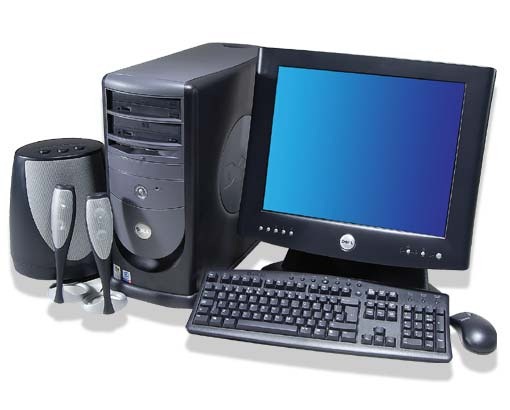
I would like to take a moment to say goodbye to my Dell Dimension 8200 system. 😦 I’ve slayed many monsters and demons on the Diablo series, and fragged many friends playing the Quake series, and destroying the the AI players in HOMM3 (plus actual work stuff).
When it’s time to decommission your home PC, think about the following:
Do you have a current backup?
- Your first answer should be, “Let me double check.” There are a lot of options available such as; portable USB hard drive, DVD, CD, NAS, and cloud storage. I use a portable USB hard drive on my main computer, cloud storage to keep data synced between devices, and DVDs for long term storage.
Do you really need to recycle that PC?
- Sometimes you can format the hard drive, reinstall the OS and start with a “factory build” image (make sure you have all your serial numbers and installation media or programs). You could also install Linux which requires far less system resources. My Dell 8200 ran Ubuntu, Linux Mint, and TurnKey Linux over the last few years.
- Check with family and friends or nonprofits in your area. Some nonprofits will supply a tax receipt for your donation. Take the time during the hard drive wipe to double check the federal tax laws, and be honest when it comes to the value of your PC.
Wipe the hard drive!
- Besides finding websites that will install malicious software to kill your PC, you can download free hard drive wipe programs, purchase wipe programs on-line or at a retail store, or use a bootable Linux OS from a USB or CD to wipe the drives. The wipe process will take hours to complete. My PC took 6 hours to complete.
- Over the last 10+ years, many of the companies I worked for required the hard drive be physically destroyed in addition to wiping. Some might call this excessive, I call it standard procedure. You need to remember, that hard drive once stored every bit of information about you.
- About a year ago I purchased a new paper shredder which can shred credit cards, CDs, and DVDs. I’ll go on record stating how much fun it is shredding DVDs.
Now that your ready, take the PC, glass tube monitor, and other accessories to the recycle event in your community. My community holds regular events for disposal of electronics, household hazardous waste, and other recycling programs.

Last year when a new IT Service company took over the contract from another IT Service company I was working for, they issued a new Dell Latitude E6400 notebook to each of us. This PC is not the beefiest notebook from Dell, but this is not a review of the PC. The notebook specs are:
- Intel Core 2 Duo P8700 @ 2.53GHz
- 2GB RAM (upgraded to 4GB by employer)
- Intel Video
- CDR / DVD ROM
- 14″ Screen
- SD Card Reader
- Intel network
The PC came with Windows 7 x32, Symantec EndPoint 11, MS Office 2007, and a few other applications. Being a good IT technician, I used Symantec Ghost to create a backup image the day it was delivered. At first I left the PC as is and installed a bunch of software to support the client. After a year of hard use, computer was having problems booting or just being stable. In no way is this a bash of Windows 7. I like Windows 7 but the system needed a rebuild and it was time to try something that’s been on my mind.
After sending an e-mail to my manager asking for access to the ftp server to download MS Office 2007 and Symantec EndPoint 11, I wiped out the HDD and installed Ubuntu 10.10 x64. With a 64 bit OS, I can use the full 4GB of RAM. Just like before, installation took about 20 minutes, and everything worked without having to install additional drivers. Since the client I’m working for has started to roll out Windows 7 x64, I wanted the same for my VM. Running Windows 7 x32 would be all that I need for the VM, but as I found out over the last 5 months, some applications that work in the 32bit environment will not work in a 64bit environment. Sometimes you need the native 64bit software to install or work correctly.
So I chose VMware Player to run Windows 7 x64. The VM is configured for 2.5 GB of RAM, 2 processors, with the NIC configured at bridged for DNS registration. After activating Windows 7 x64, the system was ready for MS Office 2007 and Symantec EndPoint 11. While waiting for may manager, I installed Banshee, Filezilla, Terminal Server Client, Google Chrome, Adobe Air, Tweetdeck, Adobe Acrobat Reader, Gimp, Skype, VLC, Ubuntu Tweak, Shutter, modified my Pictures Screensaver, plus a bunch of minor configurations I use for Ubuntu. After several days of using Outlook Web Access (OWA), I finally received my email with the server information and software keys.
So now I am supporting my client with Ubuntu 10.10 x64 at work. I can honestly say Ubuntu is ready for the IT professional in a real world environment. I have three different Microsoft Windows vms for supporting two non-trusting domains, covering x32 and x64 operating systems. Due to the limited resources on my notebook, I can only run one VM at a time, but that’s OK. There is a second Linux computer constantly running a Windows XP x32 OS which I use to manage one of the domains.
The nice thing about my setup is the dual monitors. The default screen is the notebook display, the second screen I use for my VMs or if I need to focus on a particular task. I usually run Banshee and Empathy IM on the small LCD, Tweetdeck minimized, and Google Chrome for all my personal stuff. Terminal Server Client is used to connect to the three Windows 2003 or 2008 severs I support orto VNC into a Windows XP workstation. Plus the other techs at work were impressed with what I accomplished.
So give Ubuntu or any Linux distro a shot at work for a month. If you plan it a little, you can have your system running Linux with a VM or two to meet your clients needs.
Categories
Ubuntu – The Movie
I originally saw this on Planet Ubuntu. Clicking the post on Planet Ubuntu will send you to Canonical Design. I liked the video so I posted a link from Youtube.
Categories
Bootchart Maverick Meerkat
However, here is my latest bootchart (located on the right under Box.net plug-in titled Orinoco-maverick-20101025-.png) from my Sager notebook.
Categories
Ubuntu 10.04 LTS Available
Today is the release of Ubuntu 10.04 LTS (Long Term Support). It just so happens today I am working at another location, one close to home. I was planning on saving the BT files to my Dropbox account sometime in the morning, run home for lunch and start the download of Ubuntu 10.04.
By 12:00PM EST I read an article from Phoronix stating a critical bug was found regarding GRUB2 not seeing other operating system(s) in a multi-boot environment. It seems like I would not be getting my copy of Ubuntu today.
Around 2:00PM EST I saw an update on the Ubuntu website using my Droid, Ubuntu 10.04 LTS is available!
Get your copy today!
Categories
Preview of Gnome 3.0
Categories
Microsoft Contributes to Linux Kernel
I wonder, with Microsoft‘s contribution to the Linux kernel, will I get to experience BSOD in Ubuntu? One of the reasons I moved to Linux was to get away from Microsoft. Microsoft products are a fine choice for some people, and heck I like Microsoft Office on Windows XP, but I wonder what the ramifications will be now they have 20,000 lines of code in the kernel. Today it is device drivers to allow Linux to run as a virtual machine on top of Hyper-V environment (Microsoft’s hypervisor and implementation of virtualization), tomorrow a new Microsoft Linux distro which will crash constantly, require anti-malware software , and one that will allow attackers to exploit a security hole in ActiveX.
=============
 Drahusz