However, here is my latest bootchart (located on the right under Box.net plug-in titled Orinoco-maverick-20101025-.png) from my Sager notebook.
Categories
 Drahusz
However, here is my latest bootchart (located on the right under Box.net plug-in titled Orinoco-maverick-20101025-.png) from my Sager notebook.

On October 10th at 10:10:10 AM, I took a screenshot of the date/time of my PC running Ubuntu 10.04 using Shutter before installing Ubuntu 10.10. I used Vuze to download the BT files for x32 and x64 versions within 15 minutes. Since I’ve had problems in the past with running Update to install the new OS over the old, I chose to backup my home directory with the rsync command to my external USB HDD. I’ve read, some people had problems installing Ubuntu 10.10 over 10.04. So I was glad I backed up and installed from scratch.
My installation went smooth. I liked the check box to install third party apps (multimedia codeces except for the DVD player). Because of this one feature, I can no longer tell people to install Linux Mint to get all the multimedia stuff running right after install. Please don’t misunderstand, I like Linux Mint a lot. I installed Linux Mint 10 RC1 as a VM on my Ubuntu system. But that’s a post for another time.
I like the purple color theme better than the orange/brown theme of the past, but I still customized my desktop. Using Crebs (Create Background Slideshow) I created a nice 15+ Star Trek rotating wallpaper theme. I also created a Halloween theme too. Plus with Ubuntu Tweak I changed the GDM wallpaper to a nice artist rendition nebula and changed the Ubuntu logo to a Star Fleet one. I didn’t bother to change the window colors, icons and sound effects yet, I’m still looking for something that will work well and easy to install or customize. I also found one thing that has helped me out over the years for reinstalling Ubuntu and Windows, keep a text document of favorite apps and other commands that make installation easy. For me this includes anything that I need to run at the CLI. After all was said and done, I had everything installed, configured and data files restored within 4 hours. No need to go back and install an application or look for a special command that enabled the Ubuntu Menu when pressing the Super key. Its all right there. Plus I add to this text file if i make a change or find a new application that is a must have for me.
Is this a perfect 10 for Ubuntu 10.10? No, but it feel like 9.95. My only grip is the mouse pad stays enabled no matter if I use a USB wired or wireless mouse. I search several posts about this issue. And although some people had some terrific answers, none worked for me. I can’t disable the touchpad in the BIOS either. With Windows 7, the touchpad can be disabled using Logitech’s application. Kind of wish Logitech would develop their software apps for Linux. But I can’t fault Ubuntu for this.
If you haven’t tried Ubuntu 10.10, download a Live CD and try it on your PC. I think you will be surprised with this OS. Now if only Battlefield Heroes would work on Ubuntu.

Well it’s been a busy month for me at home and work. I migrated my Sager NP8690 to Ubuntu 10.04 and created three virtual machines; Windows XP, Windows Vista, and Windows 7. To my surprise Windows Vista SP2 is extremely stable as a VM. I disabled UAC because I don’t like being asked “are you sure you want to do this” from my PC. Both Windows 7 and Windows XP SP3 ran well also. Over all I was pleased with the performance from each VM. Of course that changed when I tried to run two VMs at the same time, I was running out of RAM. I think if I had 8GB installed, running two VMs would have worked fine.
However, I was never able to get get Blu-Ray running in any VMs or in Ubuntu. This bummed me out since I wanted I watch Star Trek. Maybe I’ll ask Santa to bring a Blu-Ray player for Christmas. Then I was informed by my wife that she needed Windows in order to work from home. Plus she was not too thrilled that I didn’t create a account in Ubuntu for her. Oops!
So I backed up everything (again) and reinstalled the image I took before wiping out my hard drive. Since I am dual booting between Windows 7 and Ubuntu 10.04, I deiced to leave Windows with a larger partition and keep all my videos there. I can access then easily enough from Ubuntu without much hassle. I still need to install a few application in Ubuntu (Thunderbird, Filezilla) but for the most part I am finished.
Instead of trying to use Gwibber a buddy of mine said I should look into TweetDeck. TweetDeck requires Adobe Air to install and run. Being Adobe has issues with x64, there were no .deb files for my OS. I downloaded the .bin file and from a Terminal window I typed ./AdobeAIRInstaller.bin. Now I can install TweetDeck and have access to my LinkedIn, Twitter, Facebook, and Google Buzz accounts.
At work, I was asked to test a kickstart install script for RHEL 5.3 (Red Hat Enterprise Linux) client install on a test PC. I used a Dell Precision 370 which has a Intel P4 3.4 GHz single core, 2GB of RAM, 80GB Sata drive, Nvidia Quadro FX 1400 card, and a DVD drive. Installation took about 30 minutes. I test several applications, accessing network shares, and printing to several network printers. I still prefer Ubuntu or Linux Mint over RHEL, but it was fun to be part of a Linux project.
I also help with installing a new Dell server this week. The job required us to install a keyboard/mouse tray, move an existing server and tape library up, install a new IP console KVM, and install the new ESX server. Due to space limitations, we placed a LCD monitor on the side of the rack. Because I hurt my back several day earlier I was asked not to lift anything. So for me it was more of a learning experience. Hopefully I will be asked to assist with other data room projects.
Right now I’m downloading openSuse 11.3 x64 on DVD. Maybe this weekend I’ll try it out on a VM to see some of the new improvements I’ve read about.
I’ve installed Ubuntu 10.04 LTS x64 on my Sager NP8690 notebook. Installation was fast around 20 minutes. I took a break to watch some TV with my children and after their show and they went to sleep, I spent the next 2 hours installing programs like Gimp, Picasa, Shutter, GParted, Cheese, Camera Monitor, Stellarium, Skype, Vuze, Dropbox, HP LaserJet 2605dn, Bootchart, configuring Empathy, Gwibber, Nvidia drivers, and other Desktop eye-candy. Saturday I installed Thunderbird, dvdrip, some additional codecs, and restoring some files from my last backup.
I should have grabbed some screen-shots but it didn’t occur to me at the time. However, here is my latest bootchart (located on the right under Box.net plug-in titled Rubicon-lucid-20100502-1.png) from my Sager notebook.
I will rebuild the Dell Dimension 8200 with Ubuntu 10.04 and see what the performance is compared to version 9.10. I hope the Flash animation and games my children play at Cartoon Network will work better.
On my Dell desktop I use a Microsoft IntelliMouse Explorer. I’ve used this mouse for years because it is reliable and comfortable. It takes me a long time to find a mouse that I’m comfortable with. I like to play games like Diablo1 and 2, Quake 2, 3, Arena, Jedi Knight 1 and 2, and Heroes of Might and Magic 3. I use the mouse a lot and if it’s not comfortable, my hand will cramp and I won’t be happy using the PC.
After I purchased my Sager NP8690, I was using a Dell Bluetooth mouse. The mouse is ergonomic and functions well, but its not comfortable. It has too much height in the back and doesn’t feel right.
So over the last week or so I researched at Newegg.com, Staples.com, BestBuy.com, and Amazon.com several models buy Microsoft, Logitech, HP, and Kensington. I read reviews about why one mouse was better than another, which one seems to have more problems than others, and the latest technology.
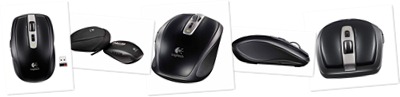
I finally decided on the Logitech Anywhere Mouse MX. Its very comfortable and as you can see from the pictures it is very cool looking too. One of the best features is the scroll wheel. It normally has the “click” when you scroll up or down. When you press the mouse wheel the free wheel is running. This is great if you have a long webpage or multi-page document. While some have complained about missing the third mouse click, I like this new feature. Also, when I click on the button behind the scroll wheel, You are presented with an exploded view of what programs are open.
This mouse also works great in Linux Mint 8. No drivers to install, just start Linux and your ready to roll. In Linux Mint 8, the button behind the scroll wheel enables the Desktop Spinning Cube (as long as you have it enabled).
I guess the most technology advanced piece is the Dark Field laser. There is a PDF in the Box.net plug-in on the right side of this blog. They say the table needs to be at least 4mm thick for it to work. I might try the bedroom mirror to see how well it works.
Tonight I dropped off my son to religious education. Classes are about 1 hour 30 minutes long. With drive time to and from the church to Starbucks, I have about an hour to kill. Usually I stop in Best Buy and hangout playing Wii games or shopping for new toys. And since my purchases are getting a little too much, I figured I would go to Starbucks with my notebook computer and have a cup of coffee.
So after purchasing a “Tall” Skinny Cinnamon Dolce Latte (forgot how expensive they are) I started up my notebook to read some e-mail and catch up on a few things. I figured this will be like the time I went to Matt Slap Subaru. Free Internet, have a cup of coffee and get out of the house. Well that didn’t work.
First they counter girl misunderstood my order and realized that I wanted the latte, and not some weird coffee they stop brewing at 5:00PM. Really?? Your a coffee house. Brew some coffee. Whatever. After booting my computer, the barista told me my vanilla skinny latte was up. Before I could say anything the girl who took my order corrected her. Then she said, “Whatever latte is up.” Excellent customer service skills!! If you don’t like your job, find a new one.
To top it off, that expensive latte doesn’t get you access to the Internet. AT&T want me to pay a fee to get on-line with their hotspot. The fee is good for 2 hours. But I am only here for an hour at most. All I wanted to do was catch up on some e-mail, enjoy a cup of coffee and wait for my son to finish school. Maybe I’m just complaining for no reason, but come one… it’s 2010. Offer free Wi-Fi to keep people coming back. You can lock it down like your competitors. Next time I think I’ll go to Brew HaHa or Panera Bread. I’m almost positive they have free Wi-Fi.
Exploring ways to live a healthier life
Reclaiming my inner badass at 50
A daily selection of the best content published on WordPress, collected for you by humans who love to read.
Informational Blog for Drone & Quadcopter Builders and Hobby enthusiast.
 Drahusz