Categories
Personal Sports

The ‘Known Cheater’ Graphic Issue

Everyone has an opinion.  Maybe the employee should have kept it to himself.  I wonder if the employee had an “uh-ho” moment.

You can watch the clip at the following link (until someone has their feeling hurt and they are required to take it down).

screen shot 2019-01-30 at 3.13.10 pm
Funny! Very funny!

https://deadspin.com/video/3630812?utm_medium=sharefromsite&utm_source=Deadspin&jwsource=cl


Categories
Home Remodeling Personal

Being Handy

Several years ago to removed an old flourescent light fixture in my kitchen and installed a new CFL bulb and fixture.  It was a nice round fixture that used a T9 and a T12 Circline bulbs.  The bulbs should last for several years, but the don’t, and once again I have to purchase new bulbs.  Not this time.

I removed the light fixture in the kitchen and replaced it with the light fixture from our bedroom. Then I installed a new light fixture (got it from a friend) in the bedroom.  I installed new Ecosmart LED lights that use 6.5 watts of power that replace 65 watt bulbs.  Kitchen looks brighter, and the new light fixture in the bedroom looks great.

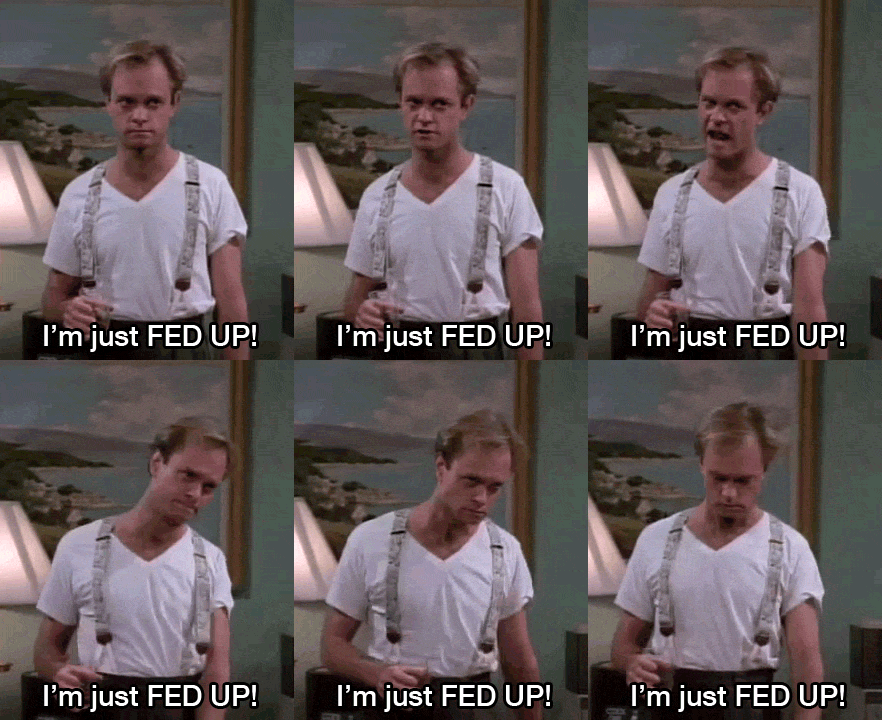
“I’m handy, now.” – Dr. Niles Craneiu

Categories
Happy New Year Personal

Hapy New Year – 2019

2019.jpg

Categories
Apple Music Personal

An 80s Theme Playlist


Flying Delorean, parachute pants, and neon everything!  Today I created an 80s playlist with album art.

https://embed.music.apple.com/us/playlist/80s-vice/pl.u-qxylK7YTGbDvPN

80s VICE

Categories
Christmas Happy New Year Personal

Merry Christmas – 2018

Untitled 1.jpg

Wishing you a blessed Christmas and a Happy New Year!

Categories
Drone Personal Phantom 3 Pro

Need Drone Time

1448ad86c6005bd1bc92fe832b36e5b7

Went to he office in my basement for the first time in about 2 weeks and noticed I have my drone sitting on my desk waiting for me.  Everytime I thjnk I’m going to fly, something else comes up.  Need to get out there and shoot some video.

Categories
Apple iPhone

Replaced my iPhone Battery

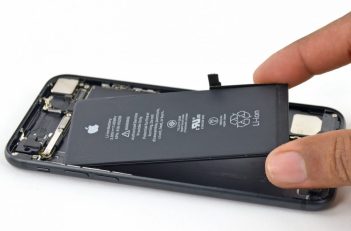
Two weeks ago (November 16, 2018) I scheduled an appointment to replace my iPhone 6S battery at the Apple Store.  I wanted to get this done while the price was still $29.99.  A quick diagnostic and it was determined that I needed a new battery.

batterie-1.jpg

I left my phone with the technician and was asked to come back in an hour.  My phone was ready right on time.  Thanks Apple!

If you need your battery replaced under the “slowing down iPhones due to battery health”, you better hurry.  It ends in 2018.

Categories
Apple Google Chrome Home PC Personal Safari

How to Disable Norton Security Extensions Popups on Mac

Back in October 2018, I purchased a 15″ 2017 Macbook Pro and to use as my main computer for home and the office.  To be compliant, I installed Norton Security on my Mac and enabled all the features including those pesky browser extensions.  The browser extensions disabled my ability to search Google from my Safari home screen and disabled my password manager, 1Password (one of my favorite applications).  So I removed the extensions and thought everything was good to go.
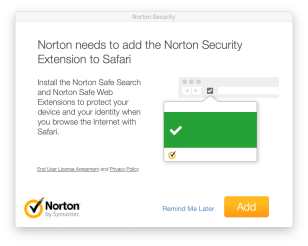
Screen Shot 2018-11-13 at 2.56.42 PM.png

Every few days I would receive a pop-up asking me to install the Norton browser extensions.  No matter what, you can’t get out of it.  Your only options are to Remind Me Later or Add.  I searched the Internet and found that nobody had a solution.  So I reached out to Norton and had the issue fixed with 30 minutes.  All you need to do is install the extensions for all your browsers and then turn them off.  Here are the steps

Safari
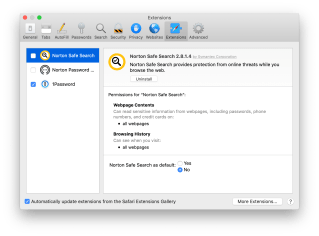
Screen Shot 2018-11-24 at 6.33.33 PM.png

  1. Open Norton Security and click Advance.
  2. Click on Safe Web and select Safari.
  3. Install Norton Safe Search and Norton Password Manager extensions in Safari.
  4. With Safari still open, click Safari from the menu bar and select Preferences.
  5. Click on Extension and remove the check from the box.

Google ChromeScreen Shot 2018-11-24 at 6.34.04 PM.png
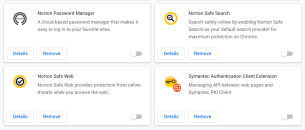
  1. Open Norton Security and click Advance.
  2. Click on Safe Web and select Chrome.
  3. Follow all the prompts to install the extensions Norton Safe Web, Safe Search, and Password Manager.
  4. Click the three dots on the menu and select More Tools and then Extensions.
  5. Turn off the Norton extensions by clicking on the blue slider button.

Ten days and about five different Wi-Fi networks later, and I have not been bothered with extension pop-ups!


Kristen's Healthy Living Blog

Exploring ways to live a healthier life

Brave & Reckless

Reclaiming my inner badass at 50

Discover WordPress

A daily selection of the best content published on WordPress, collected for you by humans who love to read.

Drone Builders Blog

Informational Blog for Drone & Quadcopter Builders and Hobby enthusiast.