Categories
Windows XP Work

How to Verify you have .NET 3.5 SP1

Today I was asked how I could verify .NET 3.5 SP1 installed successfully on several PCs running Windows XP Professional.  I searched the Internet and found several answers:

  • Check Add Remove Programs under Control Panel
  • Open Internet Explorer and enter this Javacript in the url bar:       javascript:alert(navigator.userAgent)
  • Open the registry and look for this key  HKEY_LOCAL_MACHINE\SOFTWARE\Microsoft\Windows\CurrentVersion\Internet Settings\5.0\User Agent\Post Platform\.NET CLR 3.5.30729
  • Finally click on Start => Run and enter C:\Windows\Microsoft.Net\Framework\v3.5.  You should see a folder called Microsoft Framework 3.5 SP1

Thanks to Walker News for the information.

Categories
Linux Stuff Windows 7

Windows 7 Release Party

One of my best friends, Ron, who I’ve had the pleasure to work with for about 10 years in the IT field is having a Windows 7 Release party at his house.  Since we both moved on to different companies, it’s been difficult to meet up with him.  Ron is one of the best guys I know in IT.  His skill set is strong, if he doesn’t know the answer to a problem, you can bet he will research it until he get a solution, and his customer service skills are second to none.

So I accepted his invitation to attend his Win 7 Release party.  I asked Ron what he is going to demonstrate.  Ron said, the multi-media features, how to navigate around the OS, hook up different devices, how to configure wireless, and answer questions.  I asked if he will be able to show the updated BSOD and if I should bring a Linux USB or CD to help recover his PC.

I am looking forward to seeing the final product.  I prefer Ubuntu and Mint 7, but I will need to be up to speed with Windows 7.  It will only be a matter of time before the client migrates from Windows XP / Vista to a supported OS.  All in all it should be a good time.

Categories
Fedora Core Ubuntu Windows XP Work

Rebuild Linux PCs at Work

Today is the Friday before Labor Day in the United States.  Many of the employees of the client I support are off today.  So I am taking this opportunity to rebuild my Fedora Core 11 PC (completed) and my Ubuntu 9.04 PC.  I am also building a new Windows XP PC for R&D.

So far everything is going well.

Of course I backed up my Ubuntu PC using rsync to an external HDD.  Since I decided to rework my partitions I also backed up the /home directory too.  Everything is being built from scratch.  Hopefully I can have everything finished by end of business today.

Categories
LogMeIn Windows XP

Remote Support Using LogMeIn to Resolve an Outlook Express Problem

The last several days, my brothers and I kept receiving a ton of strange e-mails from my Mom. These messages were coming in small chunks of 62 k in size, totalling 48 individual messages. At first I blew it off think my Mom sent something by mistake. We kept receiving these messages (all 48 of them) twice a day for three days. So I sent an e-mail to my brothers telling them I would fix her PC.

I live about 5 hours driving time away from my parents; so making a quick stop to see what’s wrong, get a free meal, and have a little chat is not an option. So I had my Mom do a little trouble shooting for me with the directions I gave her over the phone. No problems found. While we were troubleshooting, I asked Mom a few questions about this issue; when did this start happening, did one of your friends send you some spam or a virus, were your friends experiencing the same problem as you.  All of her friends are having the same problem as my brothers and I.  What I needed to do was sit in front of the PC try a few things and see what I can do.  I tried to run Microsoft Remote Desktop Connection, but it would not connect even though Mom enabled it for me.

Then I remember a tool my friend told me about called LogMeIn. Setting up an account only took a few minutes. After going through the e-mail verification, I had my Mom connect to the LogMeIn website, gave her my username and password (temp password that I am not using anywhere), and install the local client software. Since I was using Windows XP to help trouble shoot her problems, I used Internet Explorer to connect and take control of her PC.

I had Symantec Client Security conduct a full scan and then opened her e-mail application. The first test was sending a small text only message to myself. E-mail received correctly. So then I sent an e-mail with a 1.5 MB attachment. Bingo! Outlook Express stated it was going to break apart the message into 62k chunks, do I want to proceed. NO!!!! Since I didn’t know where to find the settings quickly, I Googled “Outlook Express break apart messages larger than” and found plenty of web sites to correct the problem. Here are the steps to resolve this issue:

  • From the Menu bar in Outlook Express, select Tools then Accounts
  • Click the mail account and then the Properties button on the right
  • Click the Advance tab
  • Under Sending, remove the check mark from “Break apart messages large than…”
  • Click the OK button and then click the Close button.

I sent three e-mails over 10 MB in size to myself as a test.  All messages arrived as they should. I disabled Remote Desktop Connection before disconnecting.

Somethings I noticed about using LogMeIn.  Although I can connect from with Ubuntu Linux using Firefox, many features were not available to me;  turning off the client wallpaper (even though it was checked), the screen refresh was painfully slow, and I could not get the remote connection to open in a new window or tab.  This might be due to the fact LogMeIn uses ActiveX.  However while writing this blog I found something that I might try out regarding using Linux with LogMeIn.  Running the same software under Windows was a completely different experience.  Everything worked as it should.

I like this product and would recommend it to anyone who needs to connect remotely.

Categories
Windows Vista Work

Running NetMeeting in Vista Update

So Wednesday July 22nd came and I attended the company meeting using NetMeeting in Vista.  Everything was going well at first, but then our manager had a document written in Excel 2007 and he was running Office 2003.  Although he had the Office 2007 Compatibility program installed some features were not available, such as clicking on a link in a chart to open the sheet which displayed additional information.

So he asked who has Office 2007, which I do, but I can’t share my Desktop or application in NetMeeting within Vista.  Solution… email everyone a copy of the Excel document and have everyone follow along manually.  Now to resolve that issue on a more permanent fix, I will install Office 2007 on my XP PC.  So when asked in the next meeting when my manager asks “who can resolve my problem”, I’ll be ready.

Categories
Windows Vista Work

Running NetMeeting in Vista

My employer uses NetMeeting 3.0x in Windows XP to hold bi-weekly meetings.  This is all good in all and runs well, but I have Vista on my PC at work and guess what, it doesn’t come with NetMeeting.  Meeting Space is standard with Vista. So I spent my lunch searching for a solution to my problem.  This is what I found and it works.

  • Download a version of NetMeeting from this link.
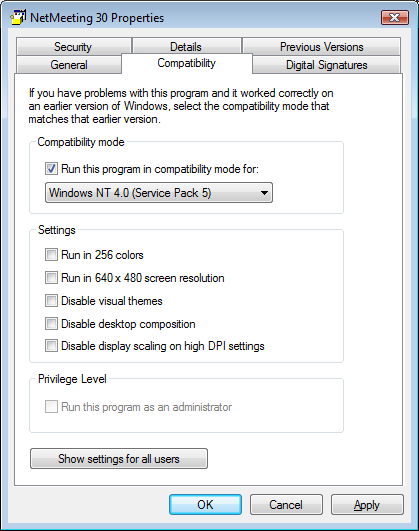
  • Right click the file and select Properties (see picture below)
  • Click on the Compatibility Tab
  • Enable the check box for Compatibility Mode and select Windows NT 4.0 Service Pack 5
  • Click Apply and OK buttons.

Now run the file and complete the installation of NetMeeting 3.0x.  One feature that is not available is Remote Desktop Sharing. This is OK if you don’t have to host a meeting or share a program, but if you do than you out of luck.  Some people has stated you need version 3.02 in order to enable Remote Desktop Sharing.  I was able to get a copy of NetMeeting 3.02, install it on my Vista PC, and still cannot enable Sharing of applications.

Net Meeting 3.01 Properties

Categories
Windows Vista Work

SATA Emulation

I asked a colleague of mine to come over and look at the HP system I was trying to load the Vista image on.  After about 5 minutes, he asked if I went into the BIOS and changed the SATA Emulation from AHCI to IDE.  Of course I didn’t, it never occurred to me. Once we made the change, the image loaded with no problems.  It is good to have colleagues who are smart and can look at your work so you  can take care of your customers.  Thanks!!

Categories
E-mail Home PC Office 2007

Outlook 2007 and the picture placeholder

Over the last few months, my wife was getting frustrated with Outlook 2007 (part of Microsoft Outlook 2007 with SP2.)   She subscribes to a few websites which offer coupons to print to help save on the grocery bills.  These e-mails are HTML enabled, and have lots of pretty pictures.  I know most of the smart people out there say “Yikes! Don’t view HTML enabled messages.”, but to be honest I like them myself.  And I know this isn’t the best security, but if you are not on my “safe-list”, then your HTML or rich text messages are set to plain text. or the HTML code is not displayed.

Now, back to her problem which became my problem.  None of the Rich Text or HTML messages were being displayed.  So I started searching the Internet and found several post regarding this issue.  Most of them suggested I run regedit and look for where Outlook was keeping the temp files and delete them.  Th reason is the temp directory is full.  Make sense to me;  how many times have you gone into a temp folder to see a ton of old Office documents that were never deleted after working on those documents.  Still the problem remained.

I figured, hey maybe Office got messed up and maybe I should repair it.  So then I logged into my account in Windows XP and checked my settings and found no problems.  I then said, to myself; “self, let’s check the registry settings on my account and compare them to  the Mrs.”  I could not find anything wrong or different when comparing the registry settings between the two accounts.  I even went as far as opening each message, clicking on the Microsoft logo in the upper left corner, click the editor button, scrolled down to Display e-mail content, and removing the check mark next to “Show Picture placeholder.” So after running through these tasks and from posts I found, nothing worked.

So after dealing with this problem, I decided to make it easy on myself by creating a new local account in Windows XP, migrating all documents, favorites, pictures, mp3, videos, and PST files.  Afterwards Outlook behaved correctly and all the messages were displayed the way the should be. Her old account is disabled so I can go back and look for what was causing this issue.  Because you know I will see this again from another family member or friend.

I know, some of you will say install Thunderbird, or say wipe out XP and give her an account in Linux.  But she is not ready for a major change.  Maybe when we replace the old family PC.  What I might do is setup and account for her so she can start to learn Ubuntu Linux and compare it to Windows 7 when it is released in late October.


Kristen's Healthy Living Blog

Exploring ways to live a healthier life

Brave & Reckless

Reclaiming my inner badass at 50

Discover WordPress

A daily selection of the best content published on WordPress, collected for you by humans who love to read.

Drone Builders Blog

Informational Blog for Drone & Quadcopter Builders and Hobby enthusiast.