Today is the release of Ubuntu 10.04 LTS (Long Term Support). It just so happens today I am working at another location, one close to home. I was planning on saving the BT files to my Dropbox account sometime in the morning, run home for lunch and start the download of Ubuntu 10.04.
By 12:00PM EST I read an article from Phoronix stating a critical bug was found regarding GRUB2 not seeing other operating system(s) in a multi-boot environment. It seems like I would not be getting my copy of Ubuntu today.
Around 2:00PM EST I saw an update on the Ubuntu website using my Droid, Ubuntu 10.04 LTS is available!
Back on February 1st 2010, I said I was going to wait on installing Linux again on my new Sager NP8690. Well that didn’t last too long. Over the past weekend I ran Symantec Ghost to backup my hard drive, downloaded and installed openSuSE 11.2 64bit. Installation went well, I installed KDE and Gnome desktop environments. However openSuSE 11.2 ran a little sluggish. Although openSuSE was my first Linux distro, I can’t see myself running a distro that doesn’t thrill me. I have a lot of respect for the openSuSE developers and I think they have a fine product. I reinstalled the backup image and move to Linux Mint 8.
With Linux Mint 8 64bit, the installation was easy as always. What I really like the most was having everything work as soon as installation was complete. Of course I had to install the Nvidia drivers to enable Desktop Effects. After rebooting the PC, I was able to log onto Facebook and run Farmville, Fishville, and Happy Aquarium. I also watched the Avatar movie preview at Apple.com/trailers, and watch the Mac Ads. I also watched a few video clips on Youtube, clips from my Video folder, and listen to MP3s.
Although I can connect to my television set using HDMI, I am unable to get the resolution correct. Also I cannot play Blu-Ray movies (Star Trek) in Linux Mint. I did read there are some hack I can run, but to be honest I would rather have a player already installed or a codex available for VLC. I wouldn’t mind paying for a native application from Corel who sell WinDVD, an application that work well from my perspective.
I plan on running Windows 7 Ultimate and Linux Mint 8 in parallel for many of my applications. Although I use IMAP for my Google account, I’m not sure I want to check e-mail on both OSs. I still may set it up, but I need to decide which OS for my primary e-mail.
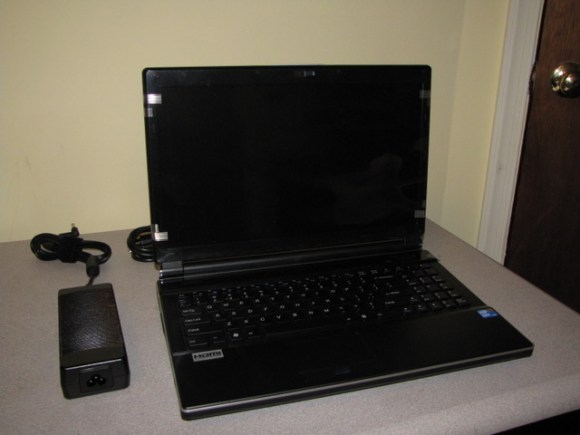
Well I finally received my new notebook on Tuesday January 26. I wanted to use my bootable BartPE USB jump drive to image the HDD before starting the first boot into Windows 7. Unfortunately I didn’t have the correct drivers in the BartPE image for the NIC or the AHCI controller. Even with this small issue, I enjoyed the nice color contrast on the 15.6″ widescreen at 1920×1080 with the glossy display. I’ve seen displays exactly like mine at retail stores. Usually the displays are all gunked up with fingerprints and grime from shoppers.
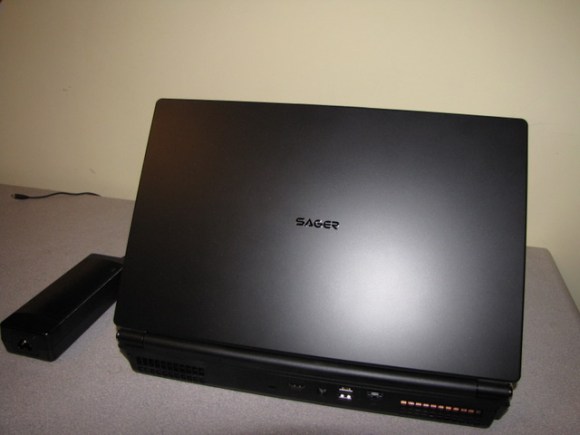
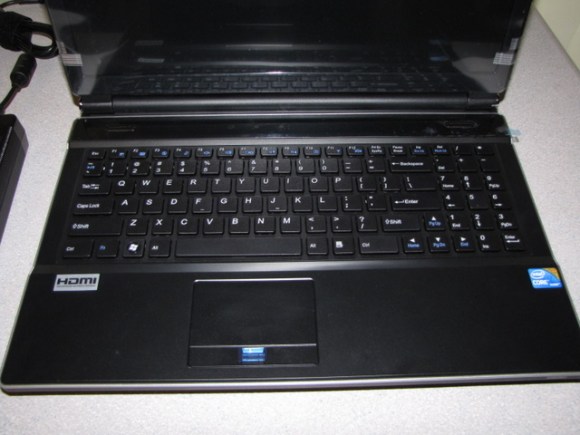
I like the simple look of the case – flat black all around except for the small silver Sager logo centered on the lid. There are only 2 stickers by the keyboard (HDMI and Intel Corei7) which does not give the computer a junked up look. The chiclet keyboard, which has a number pad on the right) took no time to get use to. Also there is little give in the center with normal pressure.
I booted into Windows 7 Ultimate and completed the mini setup wizard. I am happy to report no bloatware installed. Just the following applications:
Microsoft Office 2007 Standard 25 day trial (removed since I already own a copy of Office 2007 Professional)
Fingerprint reader
Blue-Ray player
Windows 7 recognized my wireless network and I installed the 64bit drivers for my HP 2605dn Color Laserjet network printer. Test pages printed without problems so now it was time to customize the screen by installing the Star Wars and Pittsburgh Steelers Desktop Themes I made awhile ago.
On Wednesday I installed Ubuntu 9.10 64bit – removing Windows 7 Ultimate 64bit. Ubuntu recognized everything except for the Nvidia card, but the Hardware Detection manager found the correct drivers for me and suggested which one to install. Desktop effects and Compiz were enabled and finally have the cool 3D spinning cube, wobble windows, and all the special effects I could want on my notebook. To finish up I installed the latest codecs for my multimedia files, Flash for Firefox and Virtualbox OSE. But soon I started to have some problems.
VirtualBox OSE installed correctly. I created a vm, installed Windows 7 and rebooted the vm as needed. The performance was extremely slow. WHAT?? This is a Core i7 with 6GB of 1333MHz RAM and a high-end Nvidia card with 1GB of dedicated RAM. After shutting down the vm I verified I had my settings correct and tried agin. Booting into the vm was extremely painful. I do not have this issue at work on my Intel P4 3.4GHz with 2GB of RAM. Since it was late I went to sleep to figure out what to do tomorrow. When I got home from work the next day I booted the system and logged into Facebook to catch up with some friends. While I was playing Farmville the session rebooted. That was strange. So I logged in again and went back to Facebook and the session rebooted again. After logging in a third time I googled for a reason Ubuntu 9.10 64bit would randomly reboot the session. Within three minutes it rebooted my session again.
Now I am extreamly upset with the system. I fired off an e-mail to a buddy of mine, reinstalled my Windows 7 Ultimate 64bit CD and rebooted. I spent the next several hours rebulding my PC. Windows 7 installed within 20 minutes, spent the next 30 minutes running the drivers CD (the user interface was awesome – good job to the folks who designed it), and the rest of the time spent installing Office 2007 Professional, Thunderbird 3 (with all the addons I like), Firefox 3.6, Filezilla 3.3.1, Quicktime, VLC, Google Earth, Picasa, Skype, Trillian 4.1, and a few other applications.
I really wanted to run Ubuntu on my new notebook, but the 64bit seems too unstable. Maybe I should have installed the 32bit version instead. Either way, I am happy now with Windows 7. I might at a later date install Ubuntu 10.04 or Linux Mint 9 on a second partition and have a dual-boot system.
I purchased Star Trek on Blu-Ray over the weekend and enjoyed watching the movie. The picture looked great but the sound from the computer speakers was difficult to hear with the fans running. I was able to connect the computer to my HDMI input for the TV, but the audio was not available. I might be missing a setting for HDMI.
I have two issues with this notebook – battery and bluetooth. For the battery you will get one hour out of it. You will not be playing games, watching a movie, or reading at the local coffee shop unless you have p power outlet near by. A two-hour battery should be the bare minimum for any notebook in my opinion. Everytime the computer sleeps or reboots the bluetooth is off. There is no option to leave it on in the Phoenix BIOS. I don’t think any notebook PC I’ve ever used from HP, IBM, or Dell had bluetooth off with each boot.
I also purchased a Swiss Gear IBEX backpack to carry the computer and other stuff. The bag is made of good materials and holds everything well. I did read about a few people having problems with the zippers. Out of the two bags at the store, only one had zippers that moved easily.
Besides these few issues with the hardware (battery life and bluetooth), I really like this computer. It is fast, Windows 7 works great, Ubuntu 9.10 64bit worked well the first day (maybe a different distro for me in the future), cool options available, and a sweet screen as well.
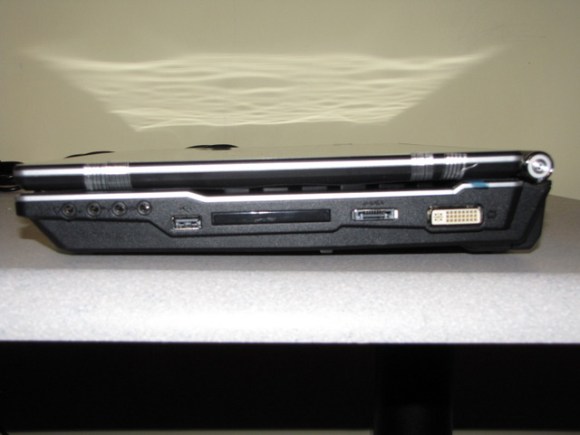
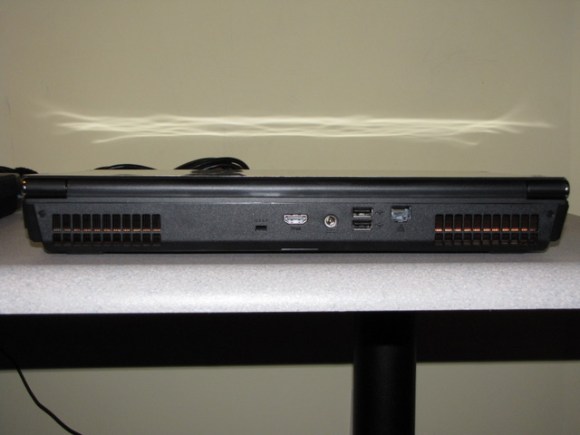
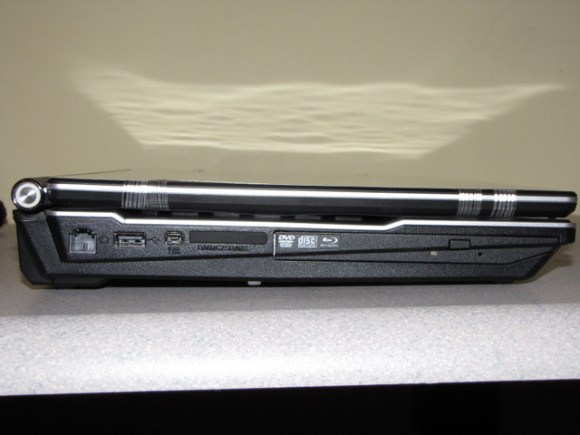
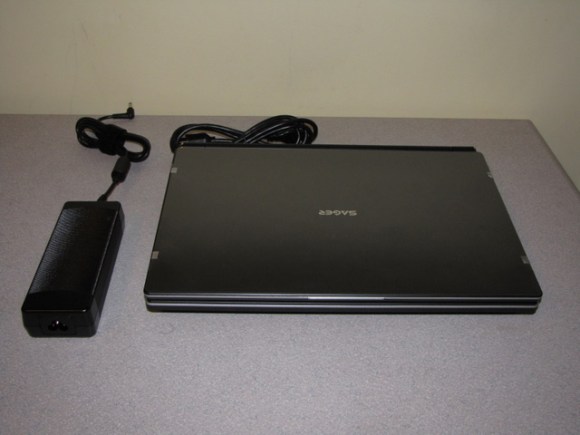
Sager NP8690Screen raisedChiclet keyboardDVI, e-sata, USB, audio input/output and express cardPower, HDMI, GB NIC, 2 USB, lockDVD / Blu-Ray, card reader, 1394 firewire, USB, and modemScreen closed with power supply
Yesterday I ordered my new notebook from Xoticpc.com. I was originally going to purchase the Serval Professional from Sysytem76.com, but I wanted to look to see if there was a better PC or if it was on sale. I soon learned Clevo manufactures the notebook I wanted and provides this notebook to retailers who re-brand the units as their own. So I searched the Internet for W860CU (one of the models Clevo builds) and started reading posts about their products and posts about different resellers who deal with them.
So I checked out several on-line retailers and discovered that I can get the same notebook PC (from what I can tell by looking at pictures) with more options than what System76 offered. So I customized the PC (see below) and compared to what I was going to order from System76. The price difference, $1.00 US. Like most of us, I want the best value I can get for my money. System76 just didn’t offer me everything I wanted: Blue-ray player, 3 year labor warranty, and upgraded thermal compound.
There was an option to purchase the PC with no OS, but I wanted to purchase Windows 7 from Newegg at a later date. Now I can have either a dual boot system or create a VM from within Ubuntu.
When the PC arrives, I plan on backing up the HDD first then wiping it our for Ubutnu 9.10. I will install Windows 7 Ultimate as a VM. As I stated before I am really starting to like Windows 7 at work. I have the Enterprise version installed on three PC and found it to be reliable.
15.6” FHD 16:9 LED Backlit Wide screen (1920×1080) Super Clear Glare Type Screen
Like many out there, I migrated from Thunderbird 2.23 or whatever version came with Ubuntu 9.10 to Thunderbird 3 the day it was released. The upgrade went painlessly for the most part. I also installed Thunderbird on my Linux Mint 8 USB jump drive. I really enjoy this new version, and must say it’s about time for an update.
Since the initial migration from Evolution to Thunderbird, I’ve never considered moving back. Thunderbird 3 is solid, reliable, multi-platform (Mac, Linux, and Windows), easy to use, and has a clean interface. I’ve installed the following add-ons: Quicktext 0.9.10, Silvermel 1.3 (theme), Lightning 1.0 pre, and Provider for Google 0.6 pre (both had to be download from Mozilla FTP site). Everything installed with no problems, and since I already had Quicktext installed before, all my signatures imported easily.
I think my only gripe, like almost everyone, Lightning should be included by default with Thunderbird. Why have an e-mail client without a calendar plugin?
A few days ago I downloaded the new ISO of Linux Mint 8. I wanted to update my USB flash drive from Mint 7, but figured I should rebuild the whole OS from scratch due to some problems I had with upgrading Ubuntu 9.04 to 9.10.
The process was simple. First I made a backup of my data and second partition to my Ubuntu 9.04 PC at work. I downloaded from pendrivelinux.com a copy of USB-Installer-For-Mint8.exe and saved it to a folder called Mint 8 on my Windows 7 Enterprise Desktop and copied over the Mint8 ISO file too.
To have the 4GB persistent file I formatted the USB drive at FAT32. I ran USB-Installer-For-Mint8.exe and followed the directions making sure I chose the correct drive to install Mint 8. A few minutes later I was done.
I booted from the USB drive and in no time was running Linux Mint 8. I changed the wallpaper to the black pinstripe, enabled Desktop effects, and installed my HP Color LaserJet 2605dn laser printer. Connecting to wireless was a snap. I also like the fact all the codecs we installed by default. Watching the Mac ads at Apple.com, checking in with Facebook, and watching videos on Youtube.com worked like it should. In my opinion, this is the way Linux should be presented to the public. Everything works, no need to install a bunch of drivers or codecs just to get basic functionality.
One thing that is confusing, the OS boots with the LiveUser account ALL THE TIME! I’ve tried to disable it, but on every reboot the PC will logon with the account mint. Even if I had to keep the account on the PC, I want to be able to pick who I am going to logon as. I was able to configure GDM to display the logon screen so I can choose which account to use.
If you haven’t had a chance to try out Mint 8, start Virtualbox-OSE or follow the directions provided by linuxpendrive.com to have a bootable USB flash drive and give it a run.
Well it turned out I had some free time on October 31st. I decided to use Update Manger (as I’ve done in the past) to migrate from 9.04 to 9.10. Well that was a mistake. First off, it took forever since everyone was upgrading at the same time. I was not too happy about that, but it was my fault.
After the wonderful process was complete, I noticed several things that didn’t work:
Sound card was non-existent (never had that problem with any Linux distro)
Ubuntu would not start in the new Linux 2.6.31 kernel
Boot time was almost 90 seconds (I thought it was suppose to be faster)
Needless to say I was disappointed. Although I had a backup image of my home partition, I figured it was time to back it up into a new folder and wipe the / partition and rebuild from scratch. So November 1st at 12:00PM after the backup completed, I booted off the Ubuntu CD I downloaded using Vuze. Within about 30 minutes or so, I wasn’t watching the clock too closely, I was able to get a fresh install of Ubuntu 9.10 up and running.
Much better!! Everything worked as it should this time. And the nice thing, I alny had to install a few things to get all the multimedia up and running. I can play MP3s, my videos I saved from YouTube, watching the Mac commericals on the Apple web site, and watched movie trailers on Quicktime’s web site (2 good ways to verify Quicktime is working.)
I used the Application Software Center to install Filezilla, Thunderbird, and a few other applications. All my e-mail was present and connected to my 2 accounts with almost no problems. I had to remove Lightning and Gmail Calendar and then install them from the Application Center. Now I have access to my Google Calendar.
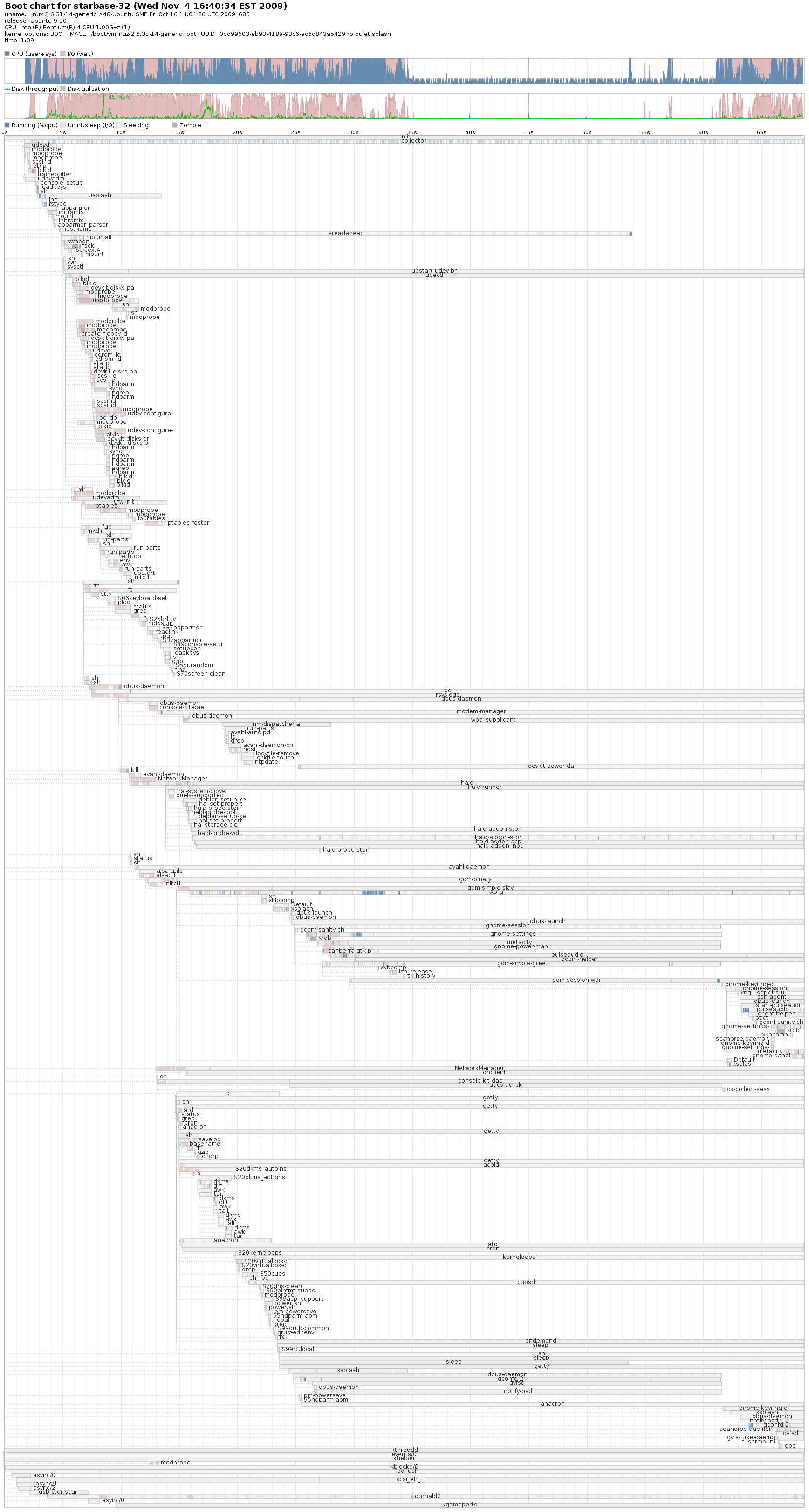
Last night I installed Picasa some Microsoft Core fonts, Stellarium, and dvdrip. I didn’t have time to try them out, but I’m sure they’ll work just fine. I also installed bootchart, and my boot time is longer than the previous OS version. The PC now takes 64 seconds to boot, what happened to boot times becoming faster?
Do I plan on updating my Ubuntu 9.04 PC at work? No. I heard but still need to confirm, there are issues with Samba server with Windows 7 clients. I have 2 Windows 7 clients that connect to my Ubuntu PC’s share for PST and document storage. Plus, since the Update Manager process was a bad experience, I would prefer to rebuild from scratch. But then that means I have to redo the Samba server, ensure I get everything setup correctly, install ssh server, install NX again, and all the other stuff I customised. I think I will wait for the next LTS.
UPDATE:
Here is the latest bootchart from my PC. 69 seconds.
Today I tried to download the iso files for Ubuntu 9.10. Needless to say it was taking hours. At one point my computer said it would take 2 days to complete! OK, time to switch to a Bit Torrent. (I am running Vuze on my home PC.) I found the BT files for Ubtunu 9.10 Desktop and Server. I had both iso files under 10 minutes.
Some people might quit their session once the files are downloaded. Not me, I’m keeping the feed going until I get home from work. Tonight I will stop at the store, pickup a stack of CDRs and burn the iso files. Since I have a lot on my plate this week, I might not get to try them out until Sunday November 1st.

 Drahusz