Categories
Linux Stuff Ubuntu

Installed KeyTouch and KeyTouch Editor

I have an old Dell Dimension 8200 which has a Dell SK 8100 with extra function buttons: E-mail, Internet Home, Search, and Sleep.  I never could never get any of these keys to work in Linux… that is until today.

I was in Synaptic Package Manager and typed in keyboard into the Search field.  In that list I saw keytouch-editor.  I remember reading about that before, but never got around to trying it out.  I selected KeyTouch Editor and installed it. KeyTouch can be found in the Control Center or under System > Preferences menu.

I was prompted by KeyTouch Editor to press any of the “extra function keys” which will bring you to a blank interface.  All you need to do is enter in the manufacture name and model number of the keyboard.  Click the New button in the bottom left, press an extra function key, and either give it a name or choose the name it KeyTouch displays.

I configured all four buttons and three of them work great.  The sleep button will not work.  For some reason it does not like the Lock Command from the Special Action Plugin menu. I’m think if I knew the line command to initate a sleep or hibernate power save, I can enter it on the program line.

Once your buttons are programmed, click on File and Save As and save the file anywhere you choose (mine is in the root of my profile.)  You will be prompted to send your file to the developer if you wish.  Although I did it really doesn’t matter.  Exit KeyTouch Editor.

But that is only the first step; you need to install KeyTouch to import your keyboard file into your system.  I opened Gnome Terminal and entered sudo apt-get install keytouch.  Now you can go back to Control Center or System > Preferences and run KeyTouch.  The Key Setting tab should be blank (mine are populated due to my settings are already entered.)  Select the Keyboard tab and click on the Change button.  A new window will open with a list of available keyboards to choose.  Click on the Import button and find your new keyboard file.  Your keyboard should be available in the list, select it and click the OK button.

Now your keyboard is displayed click on the Key Settings tab.  Select each key listed on the left side of the window and verify what action will take place.  Once complete, click the Apply and OK buttons to close out of KeyTouch.  Now you can try out your buttons.  If you programmed them correctly, your assigned programs will open.  If not, just go back and modify them.

Another nice thing about this setup, it works on all of my local accounts.

Of course additional information can be found at the KeyTouch Web Site.

UPDATE: 06/26/2009

I figured out why the sleep / hibernate button was not working.  In the Power Management section under ScreenSaver, I had the button set to “Do Nothing.”  So of course I enabled the only other option – hibernate.  It will hibernate when I press the button, but it has problems when trying to come back.  So I set the sleep / hibernate button back to “Do Nothing.”

Categories
E-mail Home PC Office 2007

Outlook 2007 and the picture placeholder

Over the last few months, my wife was getting frustrated with Outlook 2007 (part of Microsoft Outlook 2007 with SP2.)   She subscribes to a few websites which offer coupons to print to help save on the grocery bills.  These e-mails are HTML enabled, and have lots of pretty pictures.  I know most of the smart people out there say “Yikes! Don’t view HTML enabled messages.”, but to be honest I like them myself.  And I know this isn’t the best security, but if you are not on my “safe-list”, then your HTML or rich text messages are set to plain text. or the HTML code is not displayed.

Now, back to her problem which became my problem.  None of the Rich Text or HTML messages were being displayed.  So I started searching the Internet and found several post regarding this issue.  Most of them suggested I run regedit and look for where Outlook was keeping the temp files and delete them.  Th reason is the temp directory is full.  Make sense to me;  how many times have you gone into a temp folder to see a ton of old Office documents that were never deleted after working on those documents.  Still the problem remained.

I figured, hey maybe Office got messed up and maybe I should repair it.  So then I logged into my account in Windows XP and checked my settings and found no problems.  I then said, to myself; “self, let’s check the registry settings on my account and compare them to  the Mrs.”  I could not find anything wrong or different when comparing the registry settings between the two accounts.  I even went as far as opening each message, clicking on the Microsoft logo in the upper left corner, click the editor button, scrolled down to Display e-mail content, and removing the check mark next to “Show Picture placeholder.” So after running through these tasks and from posts I found, nothing worked.

So after dealing with this problem, I decided to make it easy on myself by creating a new local account in Windows XP, migrating all documents, favorites, pictures, mp3, videos, and PST files.  Afterwards Outlook behaved correctly and all the messages were displayed the way the should be. Her old account is disabled so I can go back and look for what was causing this issue.  Because you know I will see this again from another family member or friend.

I know, some of you will say install Thunderbird, or say wipe out XP and give her an account in Linux.  But she is not ready for a major change.  Maybe when we replace the old family PC.  What I might do is setup and account for her so she can start to learn Ubuntu Linux and compare it to Windows 7 when it is released in late October.

Categories
Personal

Plans for the Weekend

This weekend coming up is Father’s Day, and I think the kids might take me to see Star Trek or Up. I would prefer Star Trek (since I’ve seen everyone at a theater) but it may be too violent for kids under 6. But maybe I can do a double feature and and see both (doing my part to help the economy.) Of course I’ll be calling my Dad to wish him a Happy Father’s Day.

Categories
Ubuntu Windows 7 Work

Trying Out Windows 7 RC at Work

Well a co-worker of mine gave me the latest RC of Windows 7 to reinstall the previous version of Windows 7 on a HP PC that kept suffering from the standard BSOD.  The reason I asked for it, the PC came up on a report that it was not on, receiving any updates, and it was not reporting to the Symantec Anti-virus server.

So after installation I changed the theme from Sky Blue to Slate and changed the background from the Beta fish to something I did not expect to find, PENGUINS!  I was shocked to see penguins, and I also saw a koala bear in there too.  Does Windows 7 have a secret envy of being Linux or Ubuntu 10.04?  Here are the screen-shots from my PC.

Categories
Sports

Pittsburgh Penguins 2009 Stanley Cup Champions

Congratulations to the Pittsburgh Penguins on beating the Detroit Red Wings!  It was a great series to watch, except for Game 5.  I guess I’ll have to purchase a 2009 Championship ball cap like I do when the Pittsburgh Steelers won Super Bowls XL and  XLIII.  Yes I know the Steelers won 4 other Super Bowls, but I don’t have any ball caps from back then.

Categories
Digital Camera Video

Purchased New Digital Camera

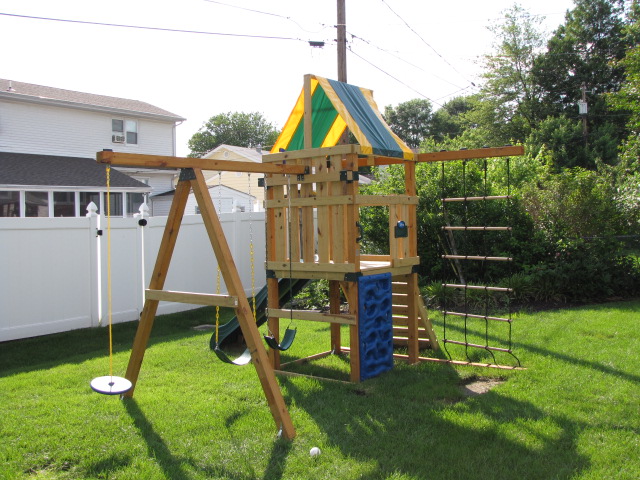
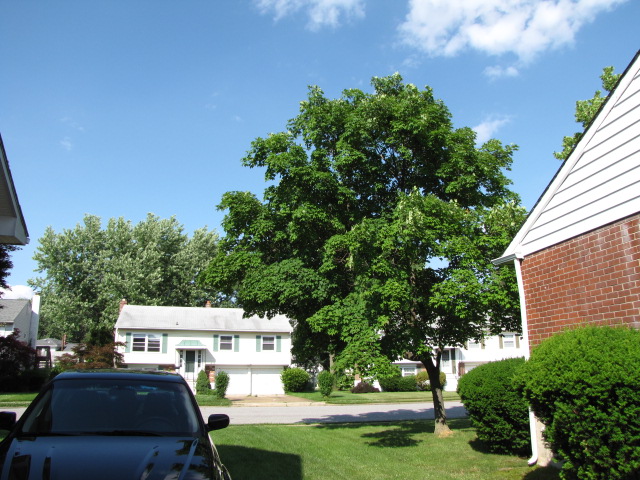
Well I purchased the Canon SX10 IS camera from Best Buy on Thursday.  I took some initial pictures with the camera set to Auto. I plan on reading the owners manual this weekend and will see about this free class at Best Buy on how to use the camera.

Swing set front right
Swing set left side
Swing set left side
Tree and sky
Tree and sky

I did not purchase a travel bag on Thursday.  I wanted to see about getting the Lowepro SlingShot 100 bag to hold this camera and the camcorder I purchased several years ago.

Because my PC and my external USB 1.1 card reader is old I did not purchase the 4 GB SDHC card.  Instead I got a 2-pak of 2 GB SD cards from SanDisk.  If I do get my PC in October, I will upgrade to the SDHC cards.

Categories
Digital Camera Dropbox

New Digital Camera

I’ve been shopping around for a new digital camera (point and shoot) and narrowed my choices down to the following; Canon SX10 IS, and the Nikon P90.  Both cameras are considered “super zooms” since they are at 20x and 24x optical zoom respectively.   Neither camera does not support HD  or HDMI connections.  However, I am having a problem making a decision on which one to get.

Canon SX10 IS:

The Canon has a 20x optical zoom, 10 MP (mega pixels), can use SDHC memory cards, records movies at a maximum resolution of 640×480 with stereo (file is saved as MOV format),can use the optical zoom while recording movies, MovieSnap (lets you take a high resolution picture while recording a movie, can shoot 1.4 fps in 3 MP while in sports mode, ISO 1600, uses SD/SDHC, MultiMediaCard, MMC Plus Card, HC MMC Plus Card,  and a 2.5″ Vari-Angle LCD which rotates 270 degrees.

Nikon P90:

The P90 has a 24x optical zoom, 12.1 MP, can use SDHC memory cards, records movies at an unknown resolution in mono (file is saved as something format), can not use the optical zoom while recording movies (only digital zoom is available), can shoot up to 15 fps in 3 MP while in sports mode, ISO 6400 capability at 3 MP, has approx 47 MB internal memory, uses SD/SDHC memory cards, and 3″ Vari-Abgle LCD which can tilt upward 90 degrees and downward 45 degrees.

On Friday June 5th I stopped at Cameras Etc to asked about the Nikon P90.  Dan the salesman said it is a great camera but they are out of stock.  He really liked the 24x optical zoom and the 12.1 MP.  When I asked about some other models, he said they were OK, but fell short of the P90.  Dan checked with his manager to see when the P90 will be in, and I have to wait until Wednesday or Thursday to see it.

On Sunday June 7th, I went to Best Buy to check out each camera.  Max the salesman from the camera department was awesome.  he let me borrow a SD memory card, plug it into the Canon and let me take a bunch of pictures and movies.  After shooting, I put the card in a PC at the Computer Department so I can upload the files to my Dropbox account so I can view them on my home PC.

We tried to get the Nikon to work after installing the SD card, but for some reason the camera would not work (yikes!!)  Could be just a fluke.

The pictures from the SX10 IS look great, too bad my subject (me) could look better.  The color looked natural, it didn’t look over saturated, and the brief movie I took looked nice.  According to VLC and Totem Movie player, the movie was recorded in stereo at 640×480.  The file was huge at 18.7 MB for a 14 second video.  I guess I can get a smaller file size if I change the resolution down to 320×240.

I hope Dan will let me shoot some pictures with the P90 and send them to my Dropbox so I can compare with the SX10 IS.

Categories
Fedora Core

Fedora Core 11

This afternoon during lunch, I downloaded Fedora 11, burned it to CD, and ran it on a test PC at work.  The PC is an HP D530 Intel P4 running at 3.00 GHz, 2 GB of Ram, and 80 GB SATA hard drive, and a unknown video card connect to a 22″ Samsung wide-screen. Currently I am writing this post using the Live User session from the CD and it works nicely.  I was pleasantly surprise that I was able to enable the Desktop Effects to have the spinning cube and wobbly windows.  Usually I have no luck with that kind of stuff.

I was going through the menu and found a cool program called Palimpsest Disk Utility. I selected drive sda and it told me the drive was running for 4.25 hours (which I know is incorrect because the PC never turns off), the current temperature, when it was last tested and updated, and assessment.  I can click on the Details button and see all kinds on information such as Spinup Time, Seek Error Rate, Write Error Rate, plus a slew of other attributes.  there is also a Self Test button which I do not want to run because this PC is a production unit, and if I goof and wipe out the hard drive, I’ll have to rebuild.

If I get a chance, I’ll have to install it on a test PC to check out the other features and see what’s new and different between FC11 and Ubuntu 9.04.  But as of right now, my work day is over and I need to head home to be with the family.

Kristen's Healthy Living Blog

Exploring ways to live a healthier life

Brave & Reckless

Reclaiming my inner badass at 50

Discover WordPress

A daily selection of the best content published on WordPress, collected for you by humans who love to read.

Drone Builders Blog

Informational Blog for Drone & Quadcopter Builders and Hobby enthusiast.