
Categories
LogMeIn Windows XP

Remote Support Using LogMeIn to Resolve an Outlook Express Problem

The last several days, my brothers and I kept receiving a ton of strange e-mails from my Mom. These messages were coming in small chunks of 62 k in size, totalling 48 individual messages. At first I blew it off think my Mom sent something by mistake. We kept receiving these messages (all 48 of them) twice a day for three days. So I sent an e-mail to my brothers telling them I would fix her PC.

I live about 5 hours driving time away from my parents; so making a quick stop to see what’s wrong, get a free meal, and have a little chat is not an option. So I had my Mom do a little trouble shooting for me with the directions I gave her over the phone. No problems found. While we were troubleshooting, I asked Mom a few questions about this issue; when did this start happening, did one of your friends send you some spam or a virus, were your friends experiencing the same problem as you.  All of her friends are having the same problem as my brothers and I.  What I needed to do was sit in front of the PC try a few things and see what I can do.  I tried to run Microsoft Remote Desktop Connection, but it would not connect even though Mom enabled it for me.

Then I remember a tool my friend told me about called LogMeIn. Setting up an account only took a few minutes. After going through the e-mail verification, I had my Mom connect to the LogMeIn website, gave her my username and password (temp password that I am not using anywhere), and install the local client software. Since I was using Windows XP to help trouble shoot her problems, I used Internet Explorer to connect and take control of her PC.

I had Symantec Client Security conduct a full scan and then opened her e-mail application. The first test was sending a small text only message to myself. E-mail received correctly. So then I sent an e-mail with a 1.5 MB attachment. Bingo! Outlook Express stated it was going to break apart the message into 62k chunks, do I want to proceed. NO!!!! Since I didn’t know where to find the settings quickly, I Googled “Outlook Express break apart messages larger than” and found plenty of web sites to correct the problem. Here are the steps to resolve this issue:

  • From the Menu bar in Outlook Express, select Tools then Accounts
  • Click the mail account and then the Properties button on the right
  • Click the Advance tab
  • Under Sending, remove the check mark from “Break apart messages large than…”
  • Click the OK button and then click the Close button.

I sent three e-mails over 10 MB in size to myself as a test.  All messages arrived as they should. I disabled Remote Desktop Connection before disconnecting.

Somethings I noticed about using LogMeIn.  Although I can connect from with Ubuntu Linux using Firefox, many features were not available to me;  turning off the client wallpaper (even though it was checked), the screen refresh was painfully slow, and I could not get the remote connection to open in a new window or tab.  This might be due to the fact LogMeIn uses ActiveX.  However while writing this blog I found something that I might try out regarding using Linux with LogMeIn.  Running the same software under Windows was a completely different experience.  Everything worked as it should.

I like this product and would recommend it to anyone who needs to connect remotely.
Categories
FaceBook

FarmTown Problems in FaceBook

Being hooked on FaceBook is something I’m not super proud of, but it is what it is.  Eventually I’ll get tired of it and move onto something else.

There are several games on FaceBook I like such as Pet Society, FarmVille and Farm Town.  Farm Town seems to have some issues with Firefox, the version of Flash, and Linux.  I was reading through some forums and found a suggestion that seems to work.  When playing the game and you want to chat but the chat window is not available, go full screen and then go back to regular.  You should see a chat window under you friends.

Also the scroll bars don’t seem to be available for other items at the store, such as coffee beans, buildings, tree, ect.  Use the Page Up and Page Down keys to move through the selections.

Here is the link to the forum.

Categories
E-mail Evolution Home PC Thunderbird

Moved from Evolution to Thunderbird 2.0.0.22

About 2 weeks ago I migrated all my e-mail from Evolution to Mozilla Thunderbird. The process itself was not difficult. I made the switch because Evolution is too slow for my PC. I also like the option to change the themes in Thurderbird just like Firefox. The current theme I am running for Thurderbird (and Firefox) is Silvermel 1.1.2.

I configured Thunderbird for 2 e-mail accounts as I had with Evolution. My Gmail account is set as default. One thing when setting up multiple accounts from two different servers, be sure to specify your SMTP server for each individual account. For example, after setting up Gmail, I added the second ISP account using the Wizard. When I went back into the ISP account, I noticed my outgoing SMTP server was configured for Gmail. You can check your setting for each account under the menu bar Edit, Account Settings.

So now my accounts are ready, but now I want to migrate my e-mails, contacts, and calendar entries to Thunderbird. I found at Make Tech Easier by Damien.

I install Lightning 0.9 Calendar add-on.  This add-on will give you a PIM system which allows you to manage you daily schedule.  It nice and works well, but I use Google Calendar.  So I installed Provider for Google Calendar 0.5.2.  This add-on allows you to read and write to your Google Calendar.  please note, the Lightning add-on is required.  You will need your Private ICAL address from Google to make this add-on work.  Since I also like to have the US Holidays too, I created a separate Google calendar in Thurnderbird called US Holidays and used the Google public address http://www.google.com/calendar/ical/usa__en%40holiday.calendar.google.com/public/basic.ics.

One thing that I could not get from Evolution for some reason was my list of birthdays and special dates.  This was one of those things that I never got around to importing into Google Calendar.  Since I still have Windows XP with Office 2007 on my other HDD, I rebooted into XP and exported my Outlook calendar to a csv file.  After importing the csv file into Google Calendar I opened Thunderbird and verified all my entries were available.  For one reason or another I had to reset the occurrence from “Does not Repeat” to “Yearly”.  More than likely I goofed the original entry way back when.

Everything looks great and is working correctly. But I like to sign my e-mails with signatures for different occasions. Some are funny (at least to me) and some have my personal information. To get this function I installed Quicktext. It’s easy to use and I created about 8 different signatures for my Gmail and ISP accounts. After you compose your message just click on the dropdown above the e-mail body field and choose your signature.

When I receive a message from one of my accounts, Thunderbird has its native popup, which works well but it doesn’t fall in-line with my Ubuntu popup notification. I found this cool addon (which is still under development) called Mozilla Notification Extensions 0.1.2. Be sure to read the “More about this add-on” section.  Once this is installed, turn off the Thunderbird popup notification and restart Thunderbird.

I left Evolution on my PC, but removed the Evolution Alarm Notifier and gmail cal I found several months ago (which allows Evolution to work better with Google Calendar) from Startup Applications.  So far I’ve been pleased with this migration. What I might want to look at is what would it take to migrate my Thunderbird setup to a USB to Windows XP or another Linux distro.

Categories
Bike Riding Personal

Bike Ride at Carousel Park

On Sunday July 26th I went for a bike ride at Carousel Park in Wilmington, DE.  It was a little warm and humid, but over all a good day for a ride.  The trail was a mix of stone and dirt paths with a few ruts from the horse trailers and hayride wagons.  The scenery included lots of trees and a white spilt rail fence with horses; and the perimeter of the park was surrounded by neighborhoods and the mail road. The park is 217 acres in size with over 6 miles of trails for me to explorer.

I’ve had this bike for 2 years with most of my riding on streets with little to no hills.  This was my first trail ride, and during my drive to the park I kept reminiscing about being a kid and riding my Huffy bike in the woods.  If you wanted to get somewhere quickly, the woods provided all the short-cuts you needed.
The first part of the ride on the Carousel Loop was easy to ride.  Going downhill on the rough terrain at 17 mph was exciting.  After the downhill run, I continued on the path with the high school on my left and the stables and indoor ring on my right.  When I reach one the lowest points in the park, I made a right and followed the Secret Escape Route.  The path takes you around the Blue Lagoon with a slight incline and then merges with the Enchanted Lake Circle path.  As I rode by I could see some people fishing at Enchanted Lake and some kids running around playing tag.
Then came the toughest part of my ride; I made a right onto Enchanted Lake Promenade.  A nice steep .25 mile ride to the top.  I had to stop half way to catch my breath. Once I reached the top I rode to my car when I could get a drink.  I wanted to see the horses one more time before I left so I rode to where they were grazing.  I sat and watched them for about 10 minutes before packing up and heading home.

Although I got my butt kicked by riding this trail, I plan on going back again (hopefully this coming weekend.)  I think I might try the Enchanted Lake Circle for a few laps.

Carousel Trail Guide

Map of the trail.

Categories
Windows Vista Work

Running NetMeeting in Vista Update

So Wednesday July 22nd came and I attended the company meeting using NetMeeting in Vista.  Everything was going well at first, but then our manager had a document written in Excel 2007 and he was running Office 2003.  Although he had the Office 2007 Compatibility program installed some features were not available, such as clicking on a link in a chart to open the sheet which displayed additional information.

So he asked who has Office 2007, which I do, but I can’t share my Desktop or application in NetMeeting within Vista.  Solution… email everyone a copy of the Excel document and have everyone follow along manually.  Now to resolve that issue on a more permanent fix, I will install Office 2007 on my XP PC.  So when asked in the next meeting when my manager asks “who can resolve my problem”, I’ll be ready.

Categories
Linux Stuff

Microsoft Contributes to Linux Kernel

I wonder, with Microsoft‘s contribution to the Linux kernel, will I get to experience BSOD in Ubuntu?  One of the reasons I moved to Linux was to get away from Microsoft.  Microsoft products are a fine choice for some people, and heck I like Microsoft Office on Windows XP, but I wonder what the ramifications will be now they have 20,000 lines of code in the kernel.  Today it is device drivers to allow Linux to run as a virtual machine on top of Hyper-V environment (Microsoft’s hypervisor and implementation of virtualization), tomorrow a new Microsoft Linux distro which will crash constantly, require anti-malware software , and one that will allow attackers to exploit a security hole in ActiveX.

=============

I was going back through my blog and remember an entry I made about Microsoft Office being available for Linux.  Maybe I should be careful of what I wish for.

Categories
Windows Vista Work

Running NetMeeting in Vista

My employer uses NetMeeting 3.0x in Windows XP to hold bi-weekly meetings.  This is all good in all and runs well, but I have Vista on my PC at work and guess what, it doesn’t come with NetMeeting.  Meeting Space is standard with Vista. So I spent my lunch searching for a solution to my problem.  This is what I found and it works.

  • Download a version of NetMeeting from this link.
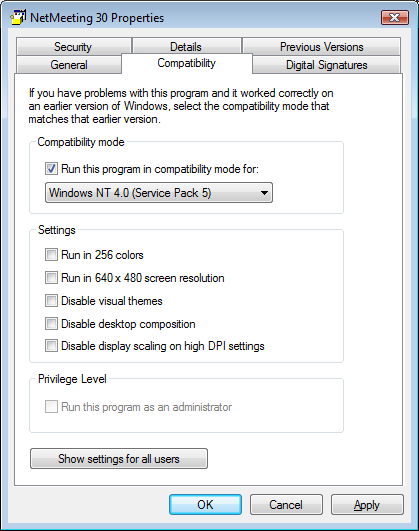
  • Right click the file and select Properties (see picture below)
  • Click on the Compatibility Tab
  • Enable the check box for Compatibility Mode and select Windows NT 4.0 Service Pack 5
  • Click Apply and OK buttons.

Now run the file and complete the installation of NetMeeting 3.0x.  One feature that is not available is Remote Desktop Sharing. This is OK if you don’t have to host a meeting or share a program, but if you do than you out of luck.  Some people has stated you need version 3.02 in order to enable Remote Desktop Sharing.  I was able to get a copy of NetMeeting 3.02, install it on my Vista PC, and still cannot enable Sharing of applications.

Net Meeting 3.01 Properties

Categories
Windows Vista Work

SATA Emulation

I asked a colleague of mine to come over and look at the HP system I was trying to load the Vista image on.  After about 5 minutes, he asked if I went into the BIOS and changed the SATA Emulation from AHCI to IDE.  Of course I didn’t, it never occurred to me. Once we made the change, the image loaded with no problems.  It is good to have colleagues who are smart and can look at your work so you  can take care of your customers.  Thanks!!

Kristen's Healthy Living Blog

Exploring ways to live a healthier life

Brave & Reckless

Reclaiming my inner badass at 50

Discover WordPress

A daily selection of the best content published on WordPress, collected for you by humans who love to read.

Drone Builders Blog

Informational Blog for Drone & Quadcopter Builders and Hobby enthusiast.